You're not using this underrated Microsoft Excel feature enough as it could save you loads of time



If your spreadsheets are starting to look like a wall of confusing formulas, you’re definitely not alone, but it might be time to start using this underrated Microsoft Excel feature.
Most people just keep adding more and more calculations until things get messy and hard to follow.
But did you know that there’s a simple trick hiding inside Excel that can clean everything up and make your work way faster?
This formula is approved by Microsoft itself, so it makes a lot of sense to try it.
This underrated Microsoft Excel feature could save you loads of time
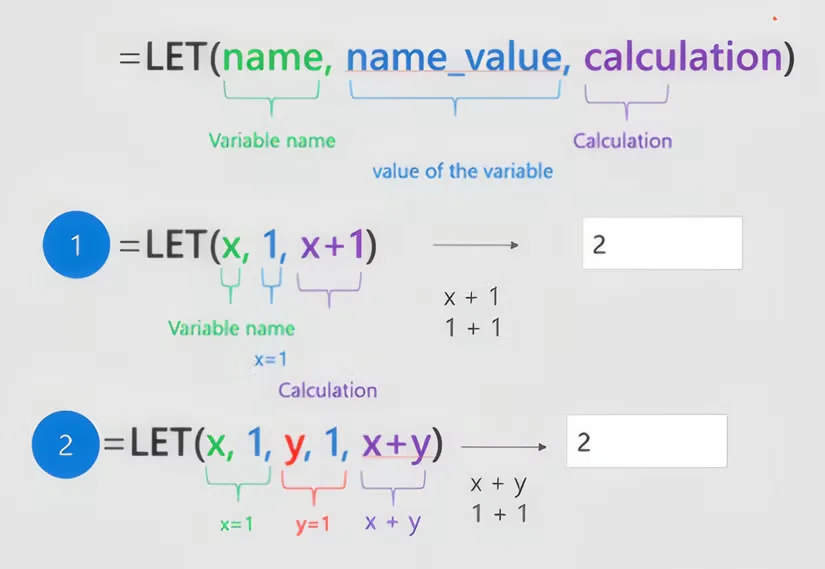
This underappreciated tech feature is called the LET function, and it’s basically like giving parts of your formula a nickname so you don’t have to keep repeating yourself.
In Microsoft Excel, you use the LET function by starting with =LET(, giving a name to a value or calculation, and then reusing that name in the rest of your formula.
For example, =LET(total, A1+A2, total*2) calculates the sum once and then uses it again, instead of repeating it, it’s a simple way to keep formulas shorter, clearer, and much easier to manage.
Here’s why people who use it swear by it:
- It cuts down repetition so you’re not typing the same calculation again and again
- It makes formulas much easier to read instead of looking like a jumble of numbers and symbols
- It can help Microsoft Excel run faster because it’s not constantly redoing the same work
- It reduces mistakes since everything is clearer and easier to follow
- It keeps your spreadsheets looking cleaner and more organised
Think of it like labelling drawers in a toolbox.
You still have all the same tools, but now you know exactly where everything is.
It will change the way you work
The great thing about LET is that it actually changes how you build spreadsheets day to day.
Here’s what that looks like in real life:
- You can label parts of your formula so they actually make sense at a glance
- Big, complicated formulas suddenly feel much more manageable
- You spend less time fixing errors caused by repeating the same thing in multiple places
- Your spreadsheets become easier for other people to understand if you share them
- Updating numbers or logic becomes quicker because you only need to change things once

The sad thing about it is that no one at all seems to really use it, which is the case for a lot of Microsoft life hacks.
A lot of Excel users stick with long, repetitive formulas simply because they don’t realize there’s a simpler option sitting right there.
So if your spreadsheets are starting to feel a bit out of control, this tiny tweak could make a seriously big difference and save you a lot of time in the long run.